Autotab
New in 3.5: CarPlay your way · a coach that feels the road · every trip kept

Your car has been keeping secrets. Autotab reads them.

Every fill-up, every invoice, every service — turned into the one number most drivers never work out: what the car really costs. Then plug in a Bluetooth OBD-II adapter and Autotab AI reads the car itself: what's wrong, whether it's safe to drive, and the cheapest fix first — on your iPhone and your CarPlay screen.

Free to start. Silver and Gold include a free trial.

New in Autotab 3.5

Every drive, kept.
Every minute of it.

With an OBD-II adapter plugged in, each drive is saved as a trip of its own — how far, how fast and what the engine did all the way — to look back at any time, under Doctor ▸ Trips. GoldOBD-II

Scrub through any trip.OBD-II

A timeline of the whole drive sits on top. Drag along it, or on any chart, and one line moves through the speed, revs, temperatures, load, fuel and battery at once. Ask Autotab AI to read the trip — paid once, free to open again — or share it as a PDF of the readings you chose to show. The newest 200 trips are kept for each car, and your iPad and Mac can look through them via iCloud Drive.

Your last drive, on Home.OBD-II

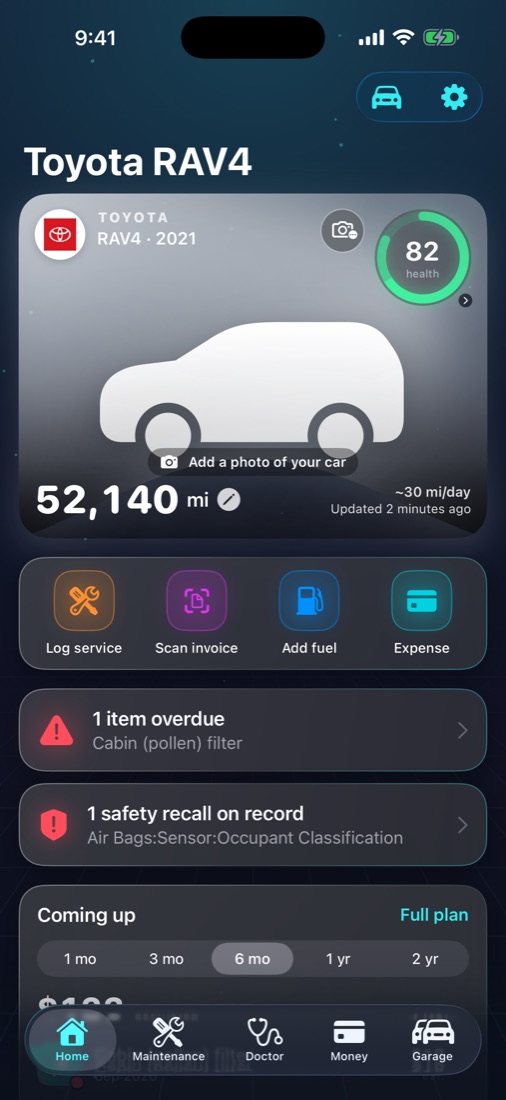
Distance, time, average speed and consumption of your latest trip, right on Home. Tap it for the whole trip.

The coach on your Lock Screen.OBD-II

Your live score and the coach's tip on the Lock Screen, in the Dynamic Island and on CarPlay's Dashboard while you drive.

A range you can trust.OBD-II

The distance left comes from how you drove the last stretch, the way your car works out its own.

A fill-up, noticed as you set off.OBD-II

Autotab spots a fill-up from the tank level and offers to log it — even when you drive off straight after filling.

A new car, recognised.OBD-II

Plug your adapter into a car that isn't in your garage and Autotab offers to add it, with its VIN already filled in.

Welcome aboard.OBD-II

When Autotab recognises your car, CarPlay welcomes you — by your name and the car's nickname, once you add them in Settings ▸ Names & greeting.

Chat with your car

Ask your car anything.
It answers from its own records.

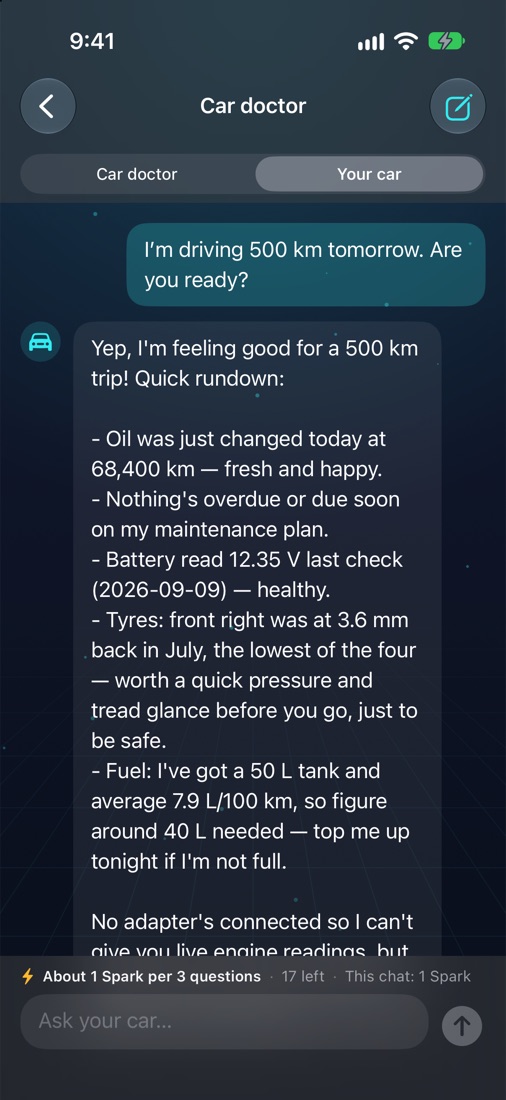
Is it ready for a long drive? What's due next, and what will it cost? Autotab answers from your car's maintenance plan, the services you logged, its fuel economy and, with an OBD-II adapter plugged in, what the car is reporting right now.

  • Two voices. Ask the car doctor, a calm mechanic, or let your car answer for itself, in the first person.
  • Hands-free. "Hey Siri, ask my car in Autotab…" and the car answers; "ask the car doctor…" and the mechanic does, in the language you speak, on the iPhone and in CarPlay.
  • Every conversation kept. Search your chats, pick one up again, rename or delete it.
  • One tap on CarPlay. The Car doctor screen asks the common questions for you, and a widget shows health, odometer and what's due at a glance.
  • Priced before you ask. About 1 Spark per 3 questions, from the Sparks in Silver and Gold.
Autotab chat: asked whether it is ready for a 500 km drive, the car answers from its own records
Driving score and live coach

Drive smoother.
Scored as you go.

With an OBD-II adapter plugged in, every drive gets a score out of 100 from the car's own speed and engine readings, and a short tip on the spot when a habit costs points. GoldOBD-II

A live coach on the dash.OBD-II

The score moves as you drive. Brake harshly, launch hard, hold high revs, idle too long, corner hard or take bumps fast, and one short line tells you what to change, never more than one every half minute.

On the car's screen.OBD-II

A Coach tab on CarPlay with every habit at a glance. A tip comes as a short message over Autotab's pages — dismiss it, or mute the coach for the rest of the drive — and over Maps or music as a notification. Plus a Driving score widget for CarPlay and your Home Screen.

It feels the road, too.OBD-II

With your iPhone in a mount, its motion sensor adds harsh cornering and bumps taken fast to the score, counted from the first metre. Bumps taken slowly never cost a point, and the readings stay on your devices.

A coach set to your taste.OBD-II

Choose how easily each habit counts, from Off to Very high — high revs included — with the button at the top of the live coach, or a long press on a counter.

Your trend, your records.OBD-II

Weekly averages, your best drive, your smooth streak and every drive month by month, kept for years and saved in your backup.

On every device.OBD-II

Drives scored on your iPhone appear on your iPad, your Mac and Autotab for Windows, through iCloud.

Also new in 3.5

Every cost, traceable.
Every page, tidier.

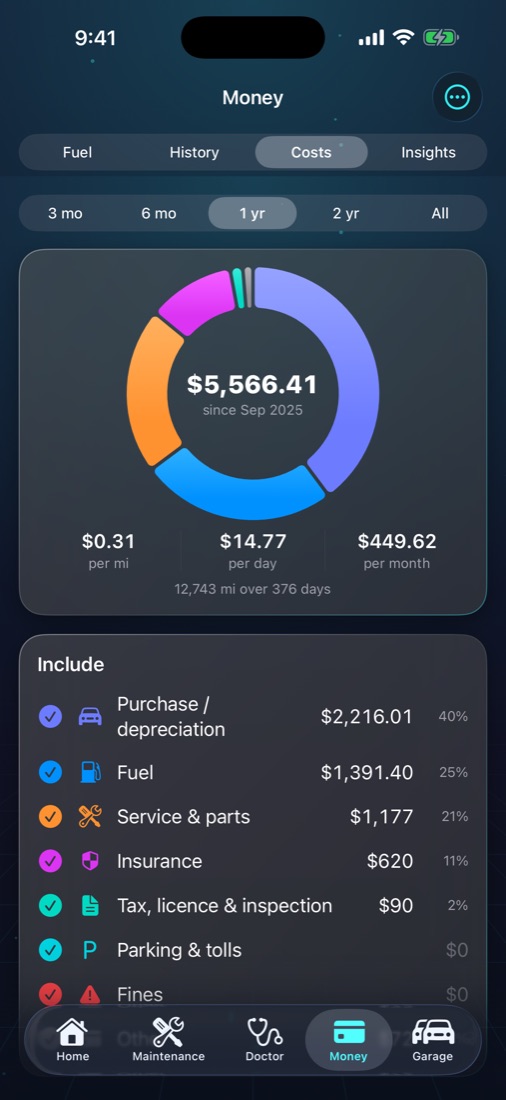
The Money tab is now called Costs: Fuel, All records, Total cost and Insights, with Settings a tap away from every page.

Tap a cost, see the records.Silver

Tap a slice of Total cost, or hold a category, and the records behind it are listed — tap one to edit it on the spot. On the Mac, click the slice or the arrow beside a category.

Typed twice? Autotab notices.

A fill-up or service that looks like one already logged is flagged before it's saved, and All records lists the pairs for you to settle: keep both, or delete the copy.

Insights, in four tabs.Silver

Overview, Fuel, Spending and Maintenance — the answer you're after is one tab away, with the period picker always in view.

Service discipline, visit by visit.Silver

Tap the Service discipline card to see each replacement it counted — on time, early or late — and open any visit to correct it.

Keep talking to Siri.

After each answer Siri asks if there's anything else, so you can follow up. Say "that's all" when you're done.

Make it yours, device by device.

Long-press to move the cards on Home, Doctor and Insights, swipe to hide the ones you don't need. Choose the glow or a calmer look, colourful or one-colour icons. Your settings follow you to your iPad and Mac through iCloud — and Settings ▸ iCloud & Windows sync ▸ Sync appearance and layout decides, on each device, whether the theme and card order follow too.

In your calendar, if you like.

Services and renewals in a calendar of their own, "Autotab Calendar", reminding you when you choose — and the dates move as your mileage changes. Off until you turn it on.

49 seconds

Your mechanic. Your co-pilot.
Your car's black box.

Real cost, invoices read for you, a maintenance plan that knows your car, live gauges on CarPlay, sport timing and drive recordings you can scrub through.

Made for the driver's seat

Your car's vitals.
On your car's screen.

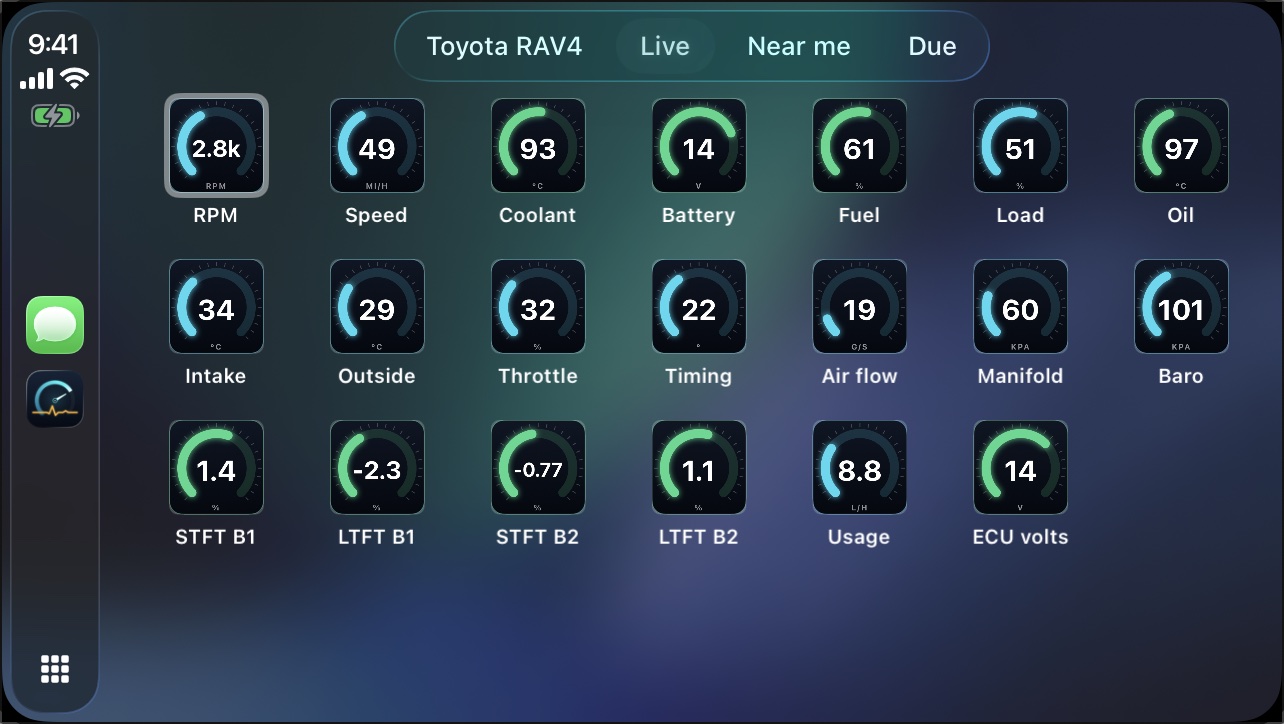
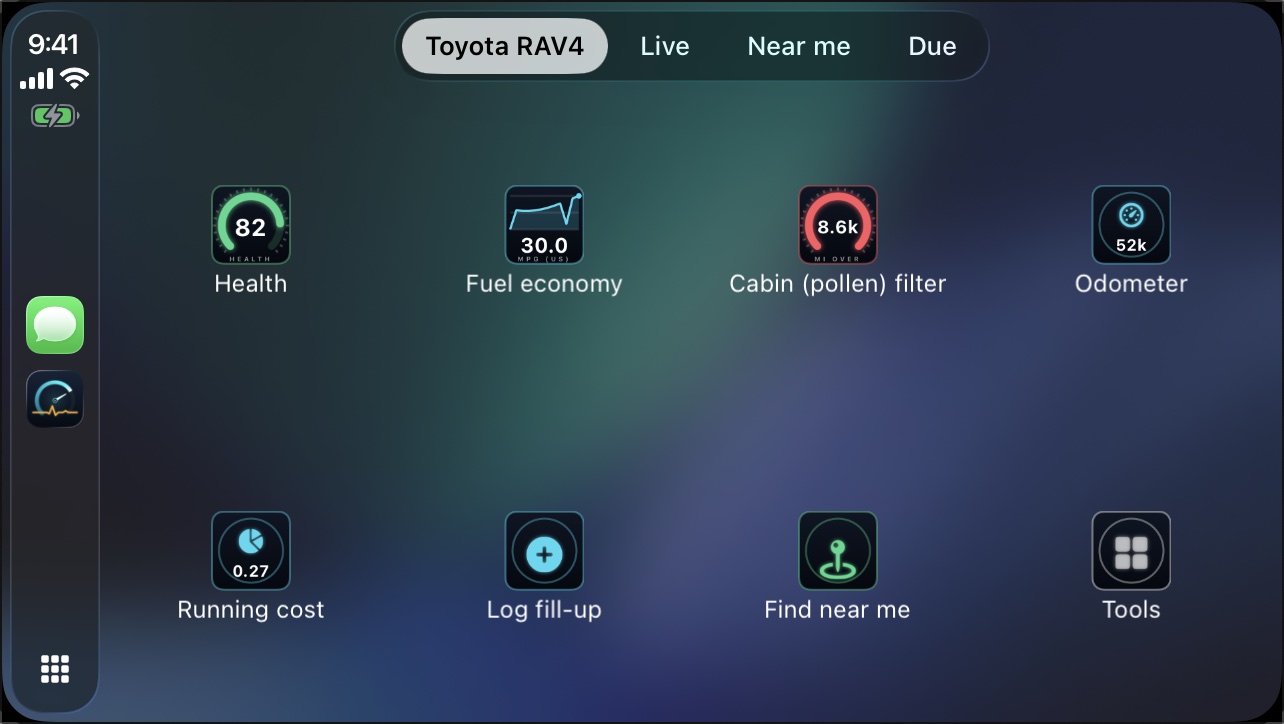
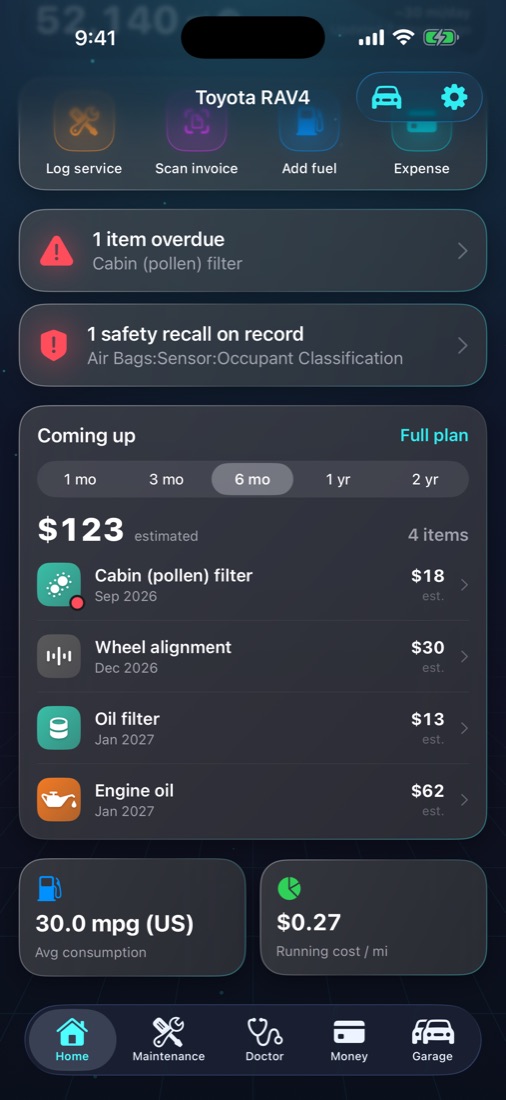
Most car apps stay on your phone. Autotab runs on CarPlay, so the numbers that matter are on the screen you're already looking at — and you decide which: any tile from the app, engine readings included, in groups you name and order, in four tile styles, kept for each car.

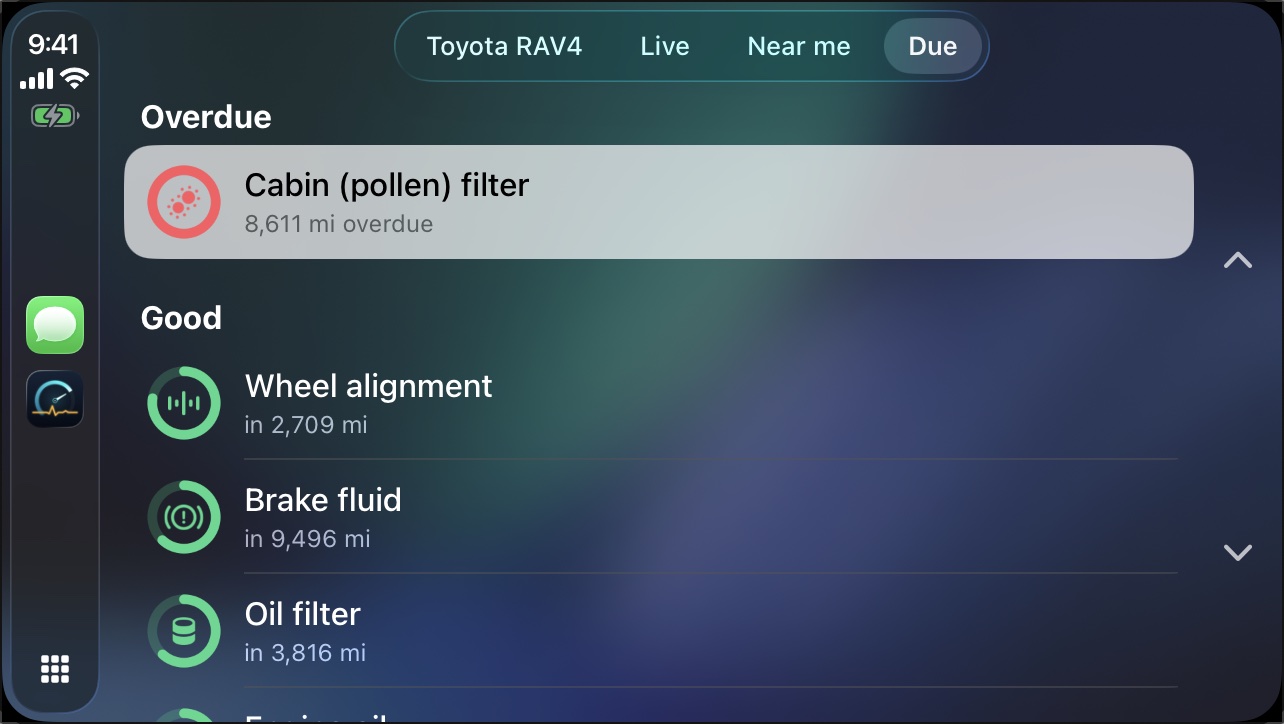
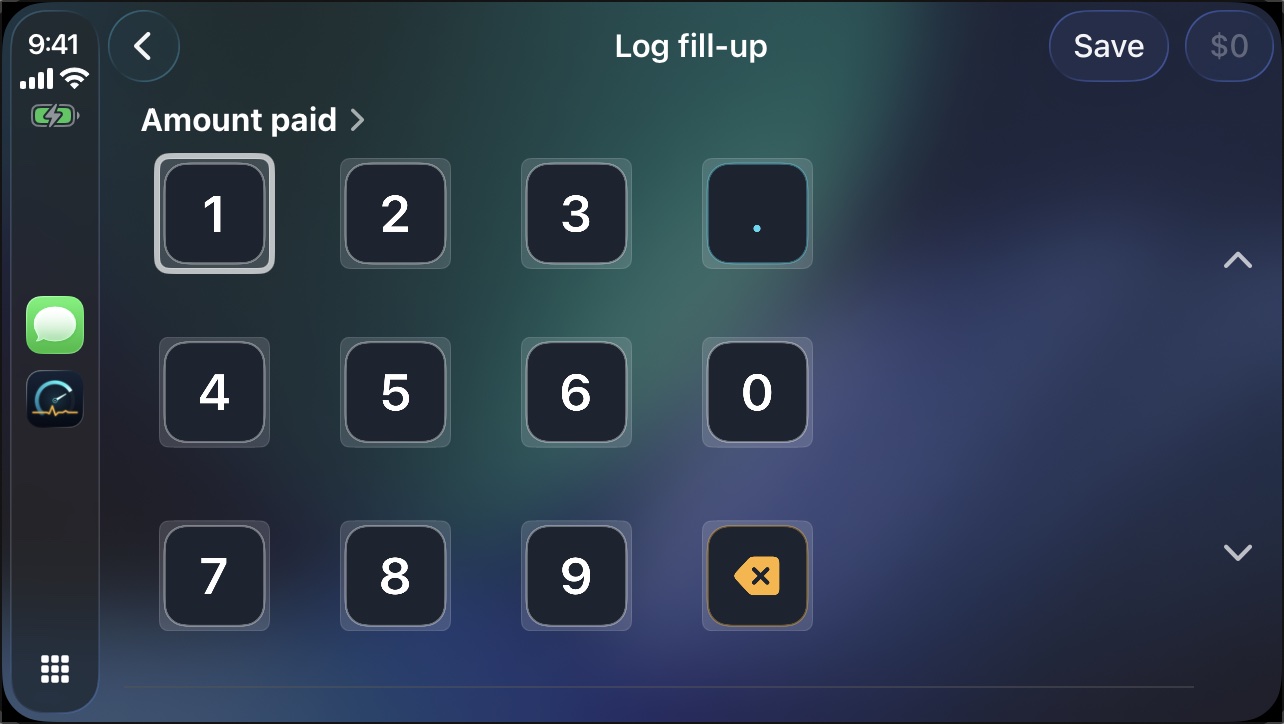
Autotab on CarPlay: live engine gauges from an OBD-II adapter Autotab on CarPlay: Home with health, fuel economy, next service and odometer Autotab on CarPlay: maintenance that is due Autotab on CarPlay: logging a fill-up on a keypad
LiveEvery engine reading as a gauge, updating while you drive. Gold OBD-II
HomeHealth score, fuel economy, the next service and running cost at a glance.
DueWhat's overdue and what's coming, in the order it matters.
Log a fill-upType the amount at the pump. The last price is already filled in.

Real screens from Autotab on CarPlay. Live readings need a Bluetooth LE OBD-II adapter. CarPlay is part of Silver; live data is part of Gold.

The whole car, in one tab

Stop guessing.
Start knowing.

Autotab does the paperwork, the arithmetic and the remembering — so the car stops surprising you.

OBD-IIneeds a Bluetooth LE OBD-II adapter, sold separately. Everything without the badge works without one.

Snap an invoice. Every line is filled in.Silver

Photograph a workshop invoice — or pick the PDF they emailed — and the date, odometer, total and every part and labour line land in your history, matched to your maintenance plan. Any language. Any currency, converted into your car's own. You check it, then save.

Never miss a service.

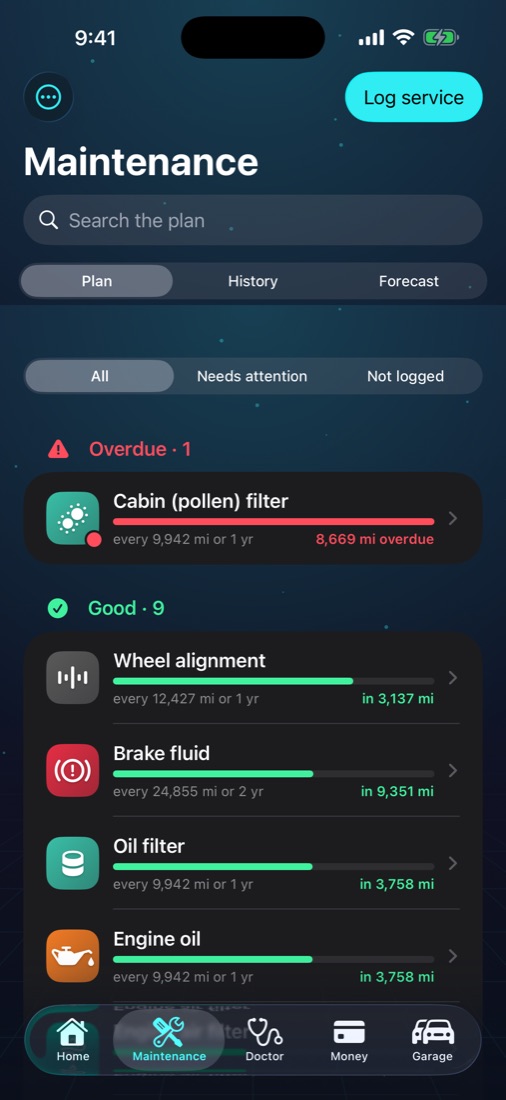
Intervals by distance and time for your make and model, adjusted to how much you actually drive. Reminders arrive before it's due.

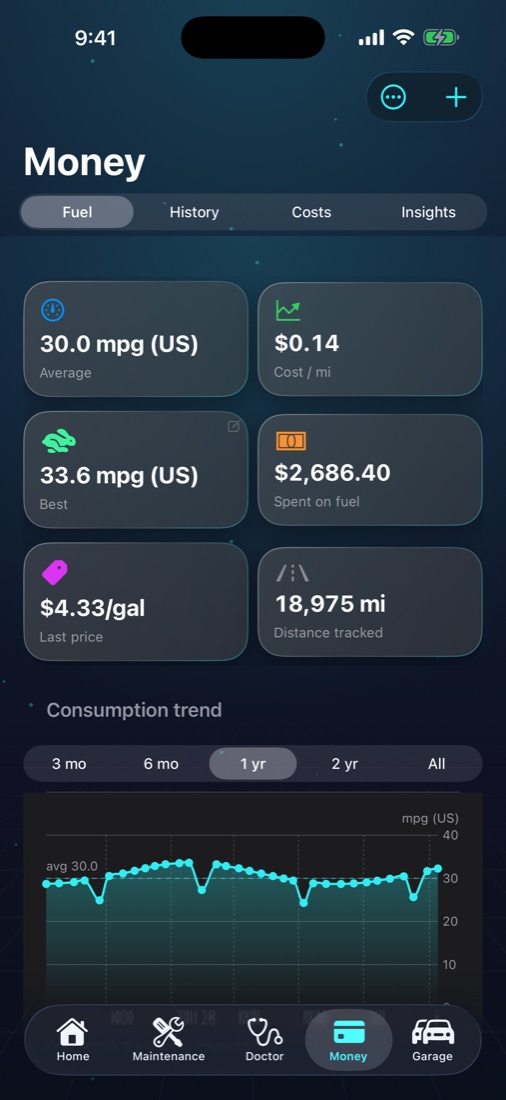
Fuel, measured honestly.

Real consumption between full tanks, tracked against your own average — and the odd tank that doesn't fit gets flagged.

avg 30.0 mpg1 tank +15%

See exactly where the money goes.Silver

Cost per mile, per day and per month. Fuel against servicing, insurance, tax and parking — and what the next twelve months are likely to cost. Tap any slice to see the records behind it.

Plug in. Watch the engine live.GoldOBD-II

Connect a Bluetooth LE OBD-II adapter (sold separately) for live gauges, fault codes in plain language, battery health — and an alert the moment a reading leaves its healthy range. Autotab even notices a fill-up from the tank level.

Right there on CarPlay.Silver

Log a fill-up at the pump with a tap and a keypad, see what's due, and — with an adapter — keep live gauges on the car's own screen.

Spot money you didn't need to spend.Silver

Parts changed before they were due, and stations that charged above the going price at the time — Insights points them out and says what they cost you.

Paperwork that reminds you.

Insurance, registration and inspection with renewal reminders. With Silver, scan one and the expiry date and cost are picked out for you.

Warning light on?

Find out what it means and whether you can keep driving — no adapter, no subscription needed.
Three taps to a perfect history

The glovebox,
finally sorted.

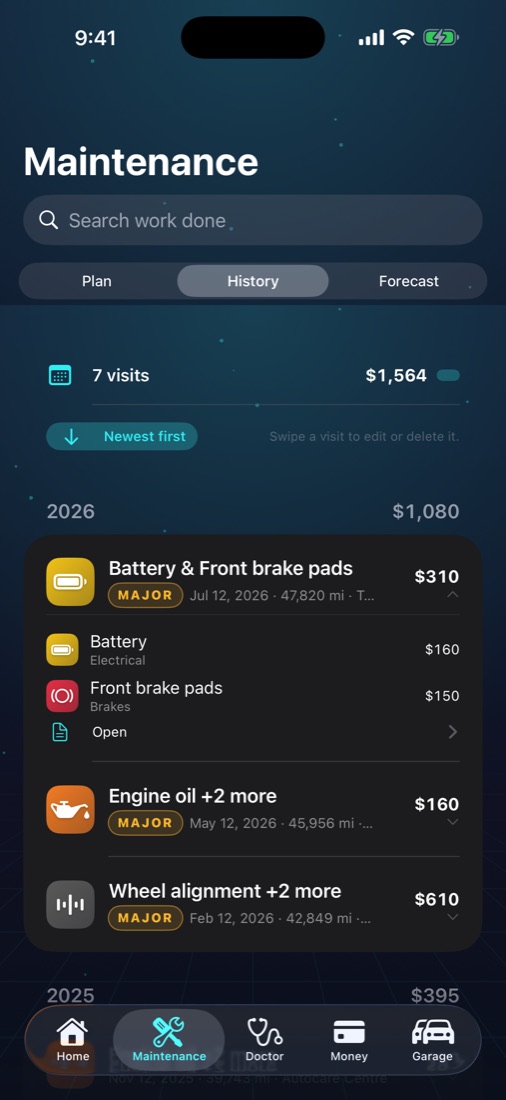
That pile of crumpled receipts is a service history worth money when you sell. Autotab turns it into one in seconds.

  1. Snap or pick a PDF. Multi-page invoices welcome.
  2. Check what was read. Totals are cross-checked line by line, so a misread row doesn't slip past.
  3. Save. Your plan moves on, reminders reset, costs update everywhere.
Autotab service history screen
Take a look

Designed like a dashboard.
Built like a logbook.

Private by design

Your car's life
is nobody's business.

No ads. Your records live on your iPhone — and, if you choose, in your own private iCloud, which we can't read.

Read the privacy policy →
  • No advertising SDK, no data broker. Anonymous usage statistics only, and you can switch them off.
  • Your iCloud, not our servers. Your garage and your settings sync across iPhone, iPad and Mac privately.
  • AI only sees what you ask about. An invoice, a reading or a drive is sent to be read only when you ask, and we don't keep it.
  • Back up everything to a file whenever you like.
Autotab AI

Diagnose your own car.
In plain words.

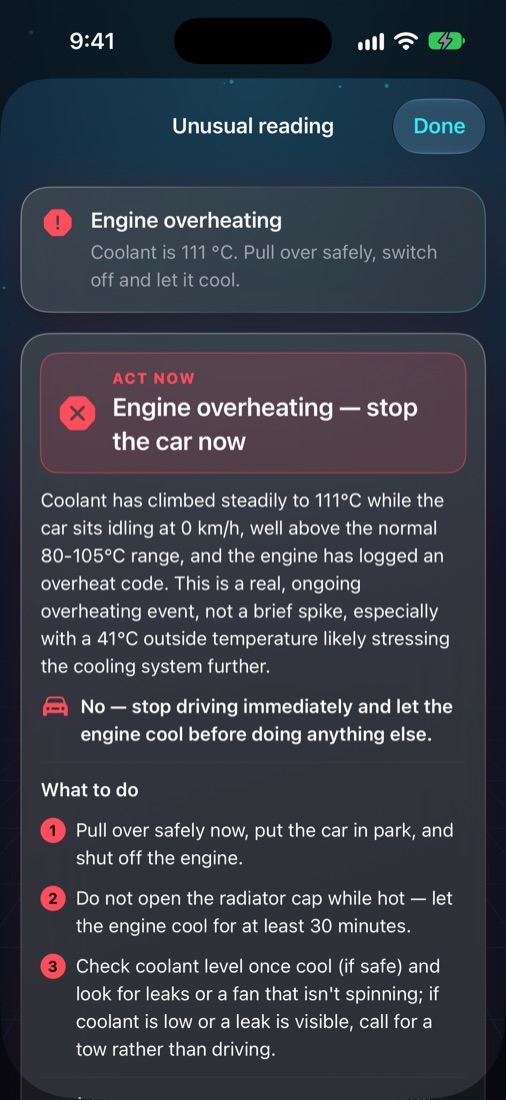
Plug a Bluetooth OBD-II adapter into your car. Autotab AI reads every sensor and stored fault code, and tells you what is going on, whether it is safe to drive, and what to do next — green, amber or red. Every AI job shows its price in Sparks before you tap.

OBD-IIneeds a Bluetooth LE OBD-II adapter. The spec sheet and Sparks work without one.

An AI health check, any time.OBD-II

Ask Autotab AI about your live readings, or tap the alert when one leaves its normal range. It reads the trend and everything else the car reports, then tells you whether it matters and whether to keep driving — on your iPhone or right on the CarPlay screen. Save the answer and check again after a fix.

Watch how it works →

A check-up from every drive.OBD-II

Record a drive, then let Autotab AI read every measurement: a health score, what went well, what to do next. One tap more for the technician's notes and a chart of every reading.

Watch how it works →

Your car's full spec sheet, from the VIN.

Type the VIN once. The manufacturer's record names the car; Autotab AI completes the sheet — engine output, capacities, oil grade, tyre sizes and pressures, battery type and the maker's service schedule — with every figure marked by where it came from. Then put it to work: set up your maintenance plan, check your tyres and compare your real economy with the rated figure. Share it as a PDF. Included once per car with Silver and Gold.

Watch how it works →

Sparks: AI with a price tag.

Most AI jobs take one Spark; a drive report or spec sheet, two. Silver includes 8 Sparks a month and Gold 18 — or the whole year at once on a yearly plan, 100 and 210. Packs of 10, 35 or 100 are there when you need more, and bought Sparks never expire.

Fault codes, explained — with the fix.OBD-II

No more searching what P0171 means. Every stored code comes back in everyday words for your car, with the likeliest fixes, cheapest first, and the ones you can check yourself before you book the garage.

Watch how it works →

CarPlay knows your car.OBD-II

Plug in the adapter and your car is recognised from its VIN. The spec sheet and the AI health check are on the car screen.

Also on Mac and Windows

The same garage,
on every screen.

Autotab runs natively on the Mac, from the same App Store download, with your cars, plan and Sparks kept in step through iCloud and a desktop widget for what is due next. Autotab 3.1 reworks it for the desk: a sidebar led by Home, Maintenance and Costs, a Car menu with keyboard shortcuts for logging a service, fuel, an expense or an invoice, ⌘1 to ⌘5 for the sections, right-click menus on cards and costs, and Arabic laid out right to left. Autotab for Windows is free on the Microsoft Store: the whole logbook, the maintenance plan, the cost insights and the OBD-II diagnostics with a Bluetooth LE adapter, with your garage and your driving scores following you from the iPhone through iCloud Drive. Your settings follow you between your Apple devices too. One subscription covers them all.

With or without an adapter

Know what works
before you plug in.

Most of Autotab needs nothing but your phone. A Bluetooth LE OBD-II adapter, sold separately, plugs in under the dashboard and lets Gold read the car itself. Which plan includes what is under Pricing below.

Works without an adapter

  • Fuel, service and expense logging, and your whole history
  • A maintenance plan for your exact car, with reminders and calendar events
  • Real fuel economy, costs you can trace to each record, insights and forecasts
  • Double entries flagged before they're saved
  • Invoices and documents read from a photo by Autotab AI
  • Chat with your car, typed or by Siri, from its records
  • A spec sheet from the VIN, safety recalls, car-to-car comparison
  • CarPlay: Home, what's due, logging a fill-up, the Car doctor screen
  • The warning-light guide, and the odometer from a photo of the dashboard

Needs an OBD-II adapterOBD-II

  • Live gauges and readings, on the iPhone and CarPlay
  • Fault codes explained, cheapest fixes first
  • AI health checks on live readings, and alerts when one looks wrong
  • Every trip kept, with a timeline, an AI read and a PDF; your last drive on Home
  • Recorded drives and AI drive reports
  • The driving score and the live coach, on the Lock Screen and in the Dynamic Island too
  • Battery health and performance runs
  • The odometer read from the car, range from your live economy, fill-ups noticed from the tank level — even as you set off
  • A new car recognised and added with its VIN; the adapter connects by itself as you get in
  • Live readings in your chat answers

Speaks every OBD-II protocol

Autotab lets the adapter search for your car's protocol first. If the car stays quiet, it tries each one in turn and keeps the first that answers, so older cars that a quick search misses still connect.

  • ISO 15765-4 CAN11 and 29-bit, 500 and 250 kbps. Almost every car since about 2008
  • ISO 14230-4 KWP20005-baud and fast init. Many European and Asian cars from before CAN
  • ISO 9141-2K-line. European and Asian cars of the late 1990s and 2000s
  • SAE J1850 VPWGeneral Motors and Chrysler cars before CAN
  • SAE J1850 PWMFord cars before CAN

Your car needs to be OBD-II: in the US from 1996, in the EU petrol cars from 2001 and diesels from 2004. Your adapter needs to support the protocol too. Many low-cost ELM327 copies have no J1850 hardware, and some cannot do K-line; adapters on genuine chips, such as OBDLink or Vgate iCar Pro, support all five. On K-line cars live readings refresh more slowly: that is the speed of the bus itself.

Pricing

Less than one oil change.
For a whole year.

Start free and keep your whole history forever. Upgrade when you want the answers.

Free

$0

Forever

  • One car
  • Unlimited fuel, service and expense logging
  • Your whole history
  • Documents and renewal reminders
  • Warning-light guide
  • iCloud sync

Silver

$14.99 / year

or $2.99 a month

Your car, organised. Maintenance and fuel tracking, done properly. No adapter needed.

  • A maintenance plan for your exact car, with reminders
  • Real fuel economy and price per litre by station
  • Up to 3 cars
  • Costs you can trace to every record, insights and forecasts
  • 8 Sparks a month for Autotab AI — invoices, documents, warning lights and chatting with your car — or 100 for the year on the yearly plan
  • A spec sheet for each car
  • CarPlay, with the Car doctor screen and widget
  • Chat with your car, also by Siri
  • Safety recalls and car-to-car comparison
Most popular

Gold

$29.99 / year

or $5.99 a month

Plug in and see inside your engine. Gold reads the car itself through an OBD-II adapter.

  • Up to 5 cars, everything in Silver
  • Live gauges and readings: coolant, oil, fuel trims, airflow, voltageOBD-II
  • Every fault code explained, cheapest fixes firstOBD-II
  • AI health checks in green, amber or red, and drive reportsOBD-II
  • A driving score for every trip, with live tips as you drive, on CarPlay and the Lock Screen tooOBD-II
  • Every trip kept, with its timeline, AI read and PDFOBD-II
  • Battery health and performance runsOBD-II
  • 18 Sparks a month — or 210 for the year on the yearly plan
  • Every feature added later

Gauges, live readings and diagnostics need a Bluetooth LE OBD-II adapter (sold separately). Without one, Gold gives you everything in Silver.

Subscribed before 15 October 2026? You keep every car and your original allowance. US prices shown; your local App Store price may differ. Monthly plans include a one-week free trial, yearly plans two weeks. Subscriptions renew automatically unless cancelled at least 24 hours before the period ends, and are managed in your Apple Account settings.

Autotab

Keep a tab
on your car.

Free to download. Takes a minute to add your car.